Start with one button. Or build every screen.
A developer connects our SDK to your iOS, Android or web app in about a day. Use our ready-made fitness and health screens, or only the motion tracking under yours.
// Open the AI Personal Trainer
webView.src =
  "https://ai.kinestex.com/trainer";
webView.onload = () =>
  webView.contentWindow
    .postMessage(data, webView.src);
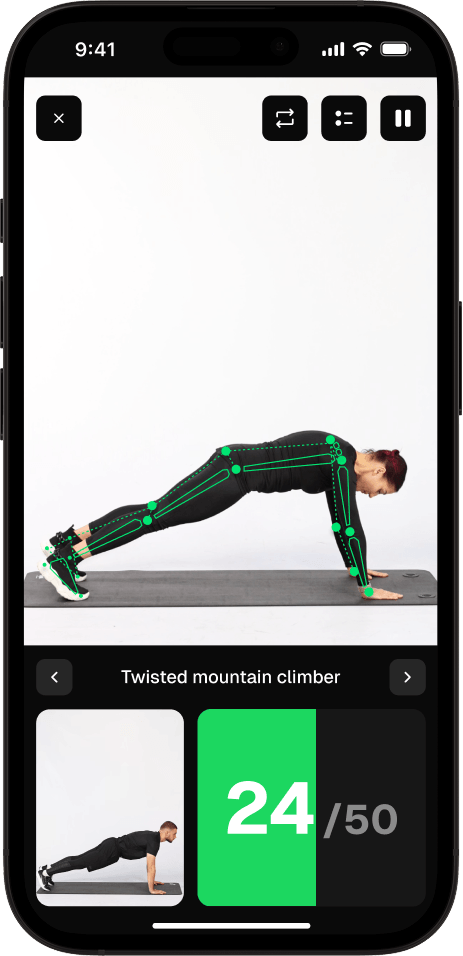




Your app stays yours.
KinesteX opens inside it.
Choose what to offer your users
Like a workout with an AI trainer or a challenge with a leaderboard. Each is a full set of screens, from first tap to results.
Add it in a day
Your developer connects our SDK with a few lines of code, on any platform.
See how it keeps your users engaged
A coach that sees every move changes how people train. Follow it in your numbers, from return visits to finished workouts.
One SDK.
Three ways to use it.
They differ in how many screens your team builds.
Ready-made Experiences
One button in your app opens our finished flows, like the AI Personal Trainer or challenges.
- You build
- One button
- Your team
- 1 developer
- Timeline
- 1 week or less
Guided Workout Experience
Your app picks exercises from our library. Our flow runs the workout, from camera setup to the last rep.
- You build
- Every screen but the workout
- Your team
- PM, designer, developer
- Timeline
- 2 to 3 weeks
Build-Your-Own Experience
You get our motion tracking as data in your app: reps, mistakes and calories.
- You build
- Every screen
- Your team
- PM, designer, developers
- Timeline
- ~1 month
We maintain everything we build. That covers the motion tracking in all three ways and the ready-made flows in the first two, designed by UX specialists and tested in real apps.
Compare all three side by sideSee what comes ready and what your team builds. Every item links to the docs.
ReadyWe built it and keep it up to date.
You buildYour team makes it with our motion tracking, or adds ours later.
| Ready-made Experiences01 | Guided Workout Experience02 | Build-Your-Own Experience03 | |
|---|---|---|---|
| What it runs on | |||
| Movement trackingCounts reps, spots mistakes and estimates calories | Ready | Ready | Ready |
| Exercise libraryExercises, workouts and plans, with motion tracking built in | Ready | Ready | Ready |
| Screens your users see | |||
| Guided WorkoutYour own exercise sequence, run in our workout flow | Ready | Ready | You build |
| AI Personal TrainerA chat that builds a personal workout and checks in after each session | Ready | You build | You build |
| Challenges and LeaderboardsTimed challenges with a leaderboard | Ready | You build | You build |
| AI GamesInteractive physical exercises, like Balloon Pop and Color Chase | Ready | You build | You build |
| Movement AssessmentsBalance, gait and mobility tests, like Timed Up and Go | Ready | You build | You build |
| Control | |||
| Admin panelDesign, workouts and usage statistics | Ready | Ready | Ready |
| Your brand on every screenWhite-label: colors, fonts, light or dark | Ready | Ready | Ready |
Not sure where to start?
Answer three questions.
You can always add more later.
Start with Ready-made Experiences
Live in a week or less with one developer. We handle maintenance.
Start with the Guided Workout or Build-Your-Own Experience
Your team builds and maintains the screens. Test the idea with a ready-made experience first.
Your brand on every screen.
White-label: your users see your app, never ours.
Your look
Set colors and fonts, in light or dark, in the admin panel.
Your choice of experiences
Open one or several, and add more later.
Your admin panel
Manage the design and the workouts, and see the results, in one place.
What you need to get started.
And the main web browsers: Chrome, Safari, Firefox and Edge.
A standard phone camera is enough. No wearables and no extra hardware.
We give you demo access and your API key when you book a call. Keep it somewhere safe.
Use the stack you already have.
 Web
 React Native
 Flutter
 iOS (Swift)
 Android (Kotlin)
You are never on your own.
Our team helps with every way in.
Your team
- Adds the SDK to your app with a few lines of code.
- Sees the results in the admin panel from the first day.
- Designs and maintains any screens you chose to build yourself.
Our team
- Supports your developer in real time during the integration.
- Tests the integration.
- Helps plan the launch and gives design and product advice.
- Maintains the technology: tracking, the exercise library and updates.
What the code looks like.
<iframe id="webView" allow="camera; autoplay; accelerometer; gyroscope; magnetometer"></iframe>
What teams ask before they start.
How long does it take?
Connecting the SDK takes a developer about a day. The whole project takes longer, depending on the way you choose: 1 week or less with Ready-made Experiences, 2 to 3 weeks with the Guided Workout, and about a month when you build every screen. Most of that time goes into your own screens.
Is it a separate app that our users have to install?
No. KinesteX opens inside your own app or website, and your users stay in it.
Can we try it before we integrate?
Yes. Book a call and we give you free access to try it. While you build, you can feed a video file instead of the live camera.
What happens to the camera video?
Movement tracking runs on your user's device. The camera video never leaves it and is not stored; only the results, like reps and calories, are sent. We do not receive names or emails, and age, height and weight are optional. The AI Personal Trainer chat needs internet, because it talks to an AI model.
Are we locked into your design?
No. With Ready-made Experiences you set colors and fonts. With the Guided Workout and Build-Your-Own Experience you design the screens yourself.
Who does the work, your team or ours?
Your developer connects the SDK. Our team supports your developer in real time, tests the integration and maintains the technology afterwards. You see the results in the admin panel.
Can the results go into our own systems?
Yes. Reps, mistakes, calories and workout results arrive in your app as events, and your app can send them on to your backend. There are also REST APIs for the exercise content and the AI Personal Trainer.
Why not build it ourselves?
You can. The build-your-own way gives you the tracking data, and you build every screen. The slow part to rebuild is the tracking, which is tuned for each exercise, and the library of exercises that goes with it. We provide both.
Can we add our own exercises?
New exercises are added together with our team, because each movement needs its own tracking. Tell us what you need and we will plan it.
See which way fits your app.
Tell us about your app, and we will suggest the right way in.