

Plan View
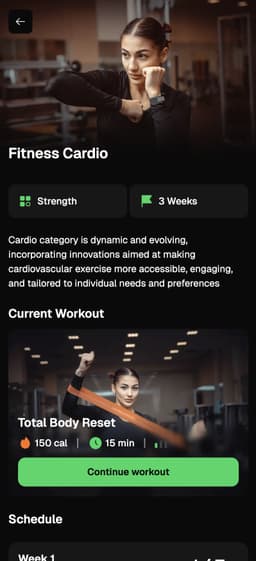
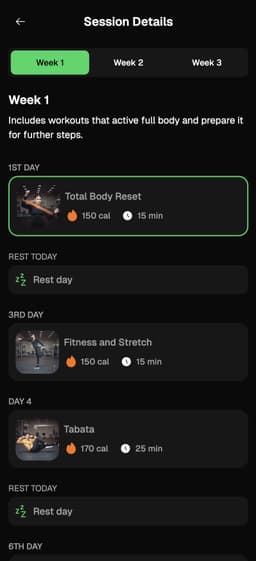
Display a specific workout plan with multiple workouts. Shows plan overview, schedule, and individual workout access.
Key Features of Our Workout Plans:
- Goal-Oriented: Supports strength, flexibility, and wellness goals
- Seamless Experience: From recommendations to real-time feedback
- Customizable: Brand-aligned app design
- Quick Integration: Easy setup for advanced fitness solutions
You can find plans in our workout library, or create your own plans in our admin portal.
+SharedWorkout UI
Exercise tracking, stats & review
Plan Integration
Display a workout plan by name or ID:
Swift example:
1kinestex.createPlanView(
2    plan: selectedPlan, // name or ID of the plan (string)
3    user: nil, // OPTIONAL: provide user details
4    isLoading: $isLoading,
5    customParams: ["style": "dark"], // dark or light theme
6    onMessageReceived: { message in
7        switch message {
8        case .exit_kinestex(_):
9            showKinesteX = false // dismiss the view
10        default:
11            print("Received \(message)")
12            break
13        }
14    }
15)Complete Example
Full implementation example with plan selection:
Swift example:
1import SwiftUI
2import KinesteXAIKit
3
4struct PlanViewIntegration: View {
5    @State private var showKinesteX = false
6    @State private var isLoading = false
7    @State private var selectedPlan = "livggb4P6zoD94VsTBB6"
8
9    let kinestex = KinesteXAIKit(
10        apiKey: "YOUR API KEY",
11        companyName: "YOUR COMPANY NAME",
12        userId: "YOUR USER ID"
13    )
14
15    var body: some View {
16        VStack {
17            Text("Select a Plan")
18                .font(.title)
19                .padding()
20
21            Spacer()
22
23            Button(action: {
24                showKinesteX.toggle()
25            }) {
26                Text("Start \(selectedPlan)")
27                    .font(.title3)
28                    .foregroundColor(.white)
29                    .bold()
30                    .padding()
31                    .frame(maxWidth: .infinity)
32                    .background(Color.green.cornerRadius(10))
33                    .padding(.horizontal)
34            }
35
36            Spacer()
37        }
38        .fullScreenCover(isPresented: $showKinesteX) {
39            kinestex.createPlanView(
40                plan: selectedPlan,
41                user: nil,
42                isLoading: $isLoading,
43                customParams: ["style": "light"],
44                onMessageReceived: { message in
45                    switch message {
46                    case .exit_kinestex(_):
47                        showKinesteX = false
48                    default:
49                        print("Message: \(message)")
50                    }
51                }
52            )
53        }
54    }
55}
56
57#Preview {
58    PlanViewIntegration()
59}