

Leaderboard View (Challenge)
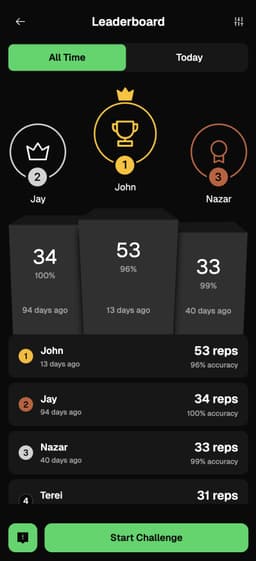
Ready-made Leaderboard: Boost User Engagement and Motivation.
- Adaptive Design: The leaderboard automatically adapts to your KinesteX UI and can be fully customized in the admin dashboard
- Real-time Updates: Whenever a new ranking is available, the leaderboard automatically refreshes to show the latest standings
Pass the exercise whose leaderboard to show and, optionally, the view's username to highlight that user (HTML: username or userId in the URL). When that user is in the list, KinesteX posts highlighted_user.
Leaving the leaderboard: the back button and View challenge both post exit_leaderboard, then open the challenge screen for the same exercise. If you only show the leaderboard, close your view on exit_leaderboard. isHideHeaderMain: true hides the back button. See Leaderboard events and Leaderboard parameters.
Leaderboard Integration
Display the leaderboard for a specific exercise:
Swift example:
1kinestex.createLeaderboardView(
2    exercise: "Squats", // Specify the exercise id or title
3    username: "", // if you know the username: highlight the user by specifying their username
4    style: IStyle(style: "dark"), // light or dark theme (default is dark)
5    isLoading: $isLoading,
6    customParams: [
7        "isHideHeaderMain": true // OPTIONAL: hide the exit button from the leaderboard
8    ],
9    onMessageReceived: { message in
10        switch message {
11        // exit_leaderboard has no typed case in KinesteXAIKit
12        case .custom_type(let data) where data["type"] as? String == "exit_leaderboard":
13            showKinesteX = false
14        case .exit_kinestex(_):
15            showKinesteX = false
16        default:
17            break
18        }
19    }
20)